Design Technology
  • Home
  • Courses
    • KS3 Product Design >
      • Year 7
      • Year 8
      • Year 9
    • Product Design >
      • Y10 PD Course >
        • Memory Stick
        • Memphis Project
      • Product Design GCSE >
        • GCSE Unit One - Exam >
          • Materials >
            • Timbers
            • Compliant Materials
            • Plastics
            • Smart & New Materials
          • Human Factors & Ethics >
            • Ergonomics & Anthropometrics
            • Inclusive Design
            • Green Design
          • Use of ICT
          • Marketing and Packaging >
            • Packaging
            • Marketing
            • Branding
            • Legal Issues
          • Evolution of Product Design >
            • Design Movements
            • Product Evolution
            • Technology Push & Market Pull
          • Safety, Quality & Consumer Issues >
            • Health & Safety
            • Quality & Consumers
          • Manufacturing & Production
          • Communication & Methodology
          • Live Exam Brief
        • GCSE Unit Two - Coursework >
          • Live Brief and Top Tips
          • Research Section
          • Design Section
          • Manufacturing Section
          • Evaluation Section
      • Product Design A Level >
        • A Level Unit One - Exam >
          • Materials >
            • Paper & Board
            • Plastics
            • Metals
            • Timbers
            • Smart Materials
            • Modern Materials
            • Composites
          • Components
          • Adhesives
          • Health and Safety
          • Product Analysis
          • Product Development
        • A Level Unit Two - Coursework >
          • Live Brief and Tips
          • Research Section
          • Design Section
          • Manufacturing Section
          • Evaluation Section
          • Summer Investigation Work
        • A Level Unit Three - Exam >
          • Materials & Components >
            • Materials Case Study
            • Industrial Testing
          • Design & Market Influences >
            • Major Developments
            • Products & Systems
            • Role of the Designer
            • Marketing Function
            • Design Methods & Processes
            • Safety & Quality
            • Communication Methods
            • Human Factors
            • Society & the Work of Designers
            • Iconic Design
            • Product Life Cycle & Sustainability >
              • Cars and Eco Design
          • Process & Manufacture >
            • ICT Applications
            • Manufacturing Systems
            • Product Development
            • Systems & Control
        • A Level Unit Four - Coursework
  • Technique
    • General Technique
    • GCSE Technique
    • AS Technique
    • A2 Technique
  • Useful Info
  • About

Communication Methods

Below are some methods designers use to communicate their ideas with clients, potential customers and manufacturers

Illustration

Mood boards - these are a collection of images, photographs, fabrics, materials, finishes etc. When placed altogether they demonstrate a particular style - this is then used to communicate with the designer or client. At this stage a style would be agreed upon and then the designer would generate ideas using this as an inspiration.

Generating Ideas

2D & 3D Sketching - used to generate quick ideas or responses to a brief. They may explore shapes and aesthetics. They are quick to produce and require very little equipment.

Enhancement

Rendering - development of initial sketches, rendering can be applied to give further indication of aesthetics, materials and textures. When using CAD an almost photographic finish can be applied to models to give a life like view of the product.

Development

CAD - used in development, designs can easily be modified and returned back to original designs with little effort. Quick aesthetic modifications can be made in terms of colour, pattern or texture and also size can be adjusted rapidly - often only a click away. These designs can then be instantly sent to other areas (e.g. other designers to work on, clients to approve, manufactures to begin work) and instantly sent back with any adjustments. Designs can also be seen in 3D view, which will give a client an immediate impression of the product. It also saves money as any initial problems can be resolved on the CAD model, then real life models don't have to be generated until the product has been assessed, saving money on producing models that aren't functional or necessary. CAD models are also highly accurate and when transferred to CAM the product produced will be identical to the CAD model.
Presentation Boards - these have high quality renderings or very detailed line drawings, they are presented to clients or potential customers to gain feedback from.

Modelling
Picture
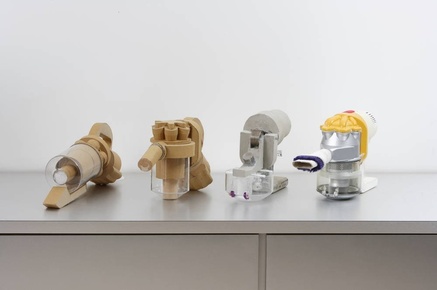
Mock Ups - made of low quality materials e.g. card or clay - mock ups are usually the step before a quality prototype is made, they made be full scale to allow ergonomic testing.
Prototypes - prototypes are used to give life size or scale impressions of the product, this allows them to be vitally ergonomically tested and tested in real life situations. They can be used to demonstrate products to clients and to gain potential customer feedback. They can also be used as the final check before money is invested in setting up production.

Information Drawing

Orthographic Projection - gives an in depth view of the product from all angles. Allows manufactures to see exactly what the product should look like.

Planning

Use of Flow Charts or Gantt Charts - these are necessary to order the processes and design a schedule for manufacture. Flow charts will map the exact making process and any areas with will need a quality check. Gantt Charts will map out how long each process would take, for example it could include time for curing, drying or cooling. These can then be used to give the project a timeline.

Powered by Create your own unique website with customizable templates.