CAD & CAM Keywords

|
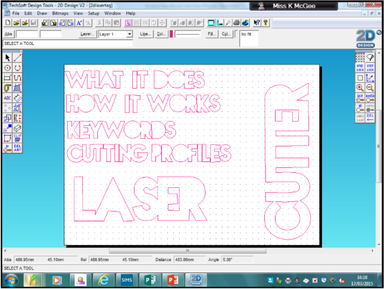
CAD: Computer Aided Design - this is a piece of software that allows you to design products in 2D or 3D. In school we use 2D Design, ProDesktop and Google Sketchup.
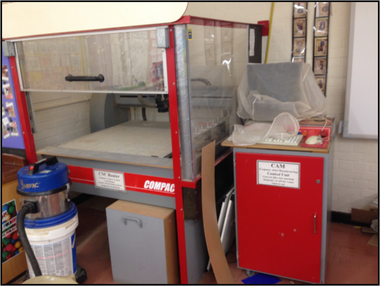
CAM: Computer Aided Manufacture - this is a piece of equipment of which it’s movements are guided by computers. In school we have the CNC Router and the Laser Cutter. CNC: Computer Numerical Control - essentially this means that a program converts your CAD work into numbers, these numbers are then converted into co-ordinates which plot the movement of the cutter. |
Use of ICT - For Designing and Before Manufacture
|
Advantages of Using CAD
1) There is no material wastage from prototypes. To make a prototype in real life you would need to use materials, using CAD software allows you to create 3D models on screen with no wastage. 2) You can see any potential areas of weakness or error before manufacture, meaning you can resolve them before manufacture and again avoiding waste. 3) You can send them instantly to anywhere in the world through email meaning you can get instant feedback on products while it’s still in the design stage. Something that isn't possible through real life prototyping due to the time and cost of mailing out. 4) You can make instant changes to design, e.g. colours or textures, and change them back if needed. |
Use of ICT - During Manufacture
|
Advantages of using CAM
1) Everything product cut out will be exactly the same as the previous product cut, the same program can carry on running. 2)Your tolerance levels are much closer due to the fact it is all cut by a machine, cutting across the same co-ordinates. |
Just in Time Production
Computers are used to check and order materials onto the production line. These products are then batch produced quickly, the computers track their progress and show when they are ready to be sent out to clients or shops. The whole process then begins again. Go to the Just in Time Methods of Production page for more detail.
Remote Manufacturing
Designers and manufacturers can work on different sites or even different countries.
The client will send the designer a brief, the designer will design the product and then send the designs to a manufacturer. The manufacturer will make the product and then it will be shipped around the world (or wherever it’s end destination is).
It is often cheaper to do this as in some countries it is cheaper to manufacture products due to low labour and raw material costs.
Benefits are a shortened supply chain to speed up ordering and production of specific parts.
Computers are used to check and order materials onto the production line. These products are then batch produced quickly, the computers track their progress and show when they are ready to be sent out to clients or shops. The whole process then begins again. Go to the Just in Time Methods of Production page for more detail.
Remote Manufacturing
Designers and manufacturers can work on different sites or even different countries.
The client will send the designer a brief, the designer will design the product and then send the designs to a manufacturer. The manufacturer will make the product and then it will be shipped around the world (or wherever it’s end destination is).
It is often cheaper to do this as in some countries it is cheaper to manufacture products due to low labour and raw material costs.
Benefits are a shortened supply chain to speed up ordering and production of specific parts.
Use of ICT - Post Manufacture
Video Conferencing
Designers can interact with their clients or target market groups through video conferencing to gain feedback at various stages.
Software Sharing
This enables clients, designers and manufacturers to send files between each other through the internet. This reduces cost of postage and allow instant sharing of ideas or modifications.
Stock Control
Computers monitor stock levels—accounting for materials being used—once the stock level is low enough they can alert you to reorder or in some cases actually reorder materials itself.
Data Transfer
For example Electronic Data Interchange (EDI) involves the transfering data from one computer to another without humans being nvolved, for example data between a retailer and a manufacturer.
Electronic Point of Sale (EPOS)
Basically the machines used at till points and their barcode scanners are used to inform pace of manufacture. Items are scanned using their unique barcode. Information shared at all points of sales and manufacture to ensure sufficient stock readily available.
Designers can interact with their clients or target market groups through video conferencing to gain feedback at various stages.
Software Sharing
This enables clients, designers and manufacturers to send files between each other through the internet. This reduces cost of postage and allow instant sharing of ideas or modifications.
Stock Control
Computers monitor stock levels—accounting for materials being used—once the stock level is low enough they can alert you to reorder or in some cases actually reorder materials itself.
Data Transfer
For example Electronic Data Interchange (EDI) involves the transfering data from one computer to another without humans being nvolved, for example data between a retailer and a manufacturer.
Electronic Point of Sale (EPOS)
Basically the machines used at till points and their barcode scanners are used to inform pace of manufacture. Items are scanned using their unique barcode. Information shared at all points of sales and manufacture to ensure sufficient stock readily available.
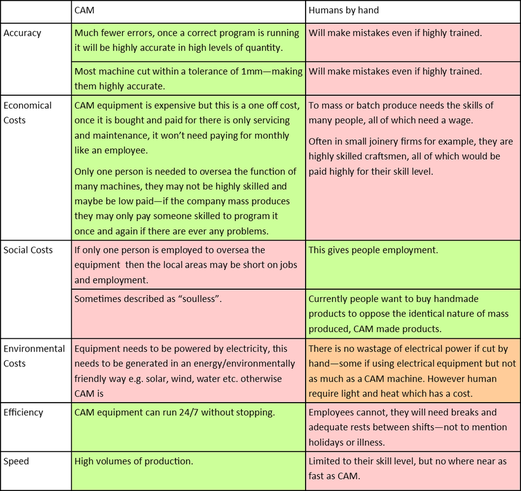
CAM Products vs Handmade Products